What to know before buying your first power station: seven lessons and five places to start
Affiliate disclosure: As an Amazon Associate I earn from qualifying purchases. Purchases made through links on this page may earn a commission at no additional cost to you. Full disclosure here.
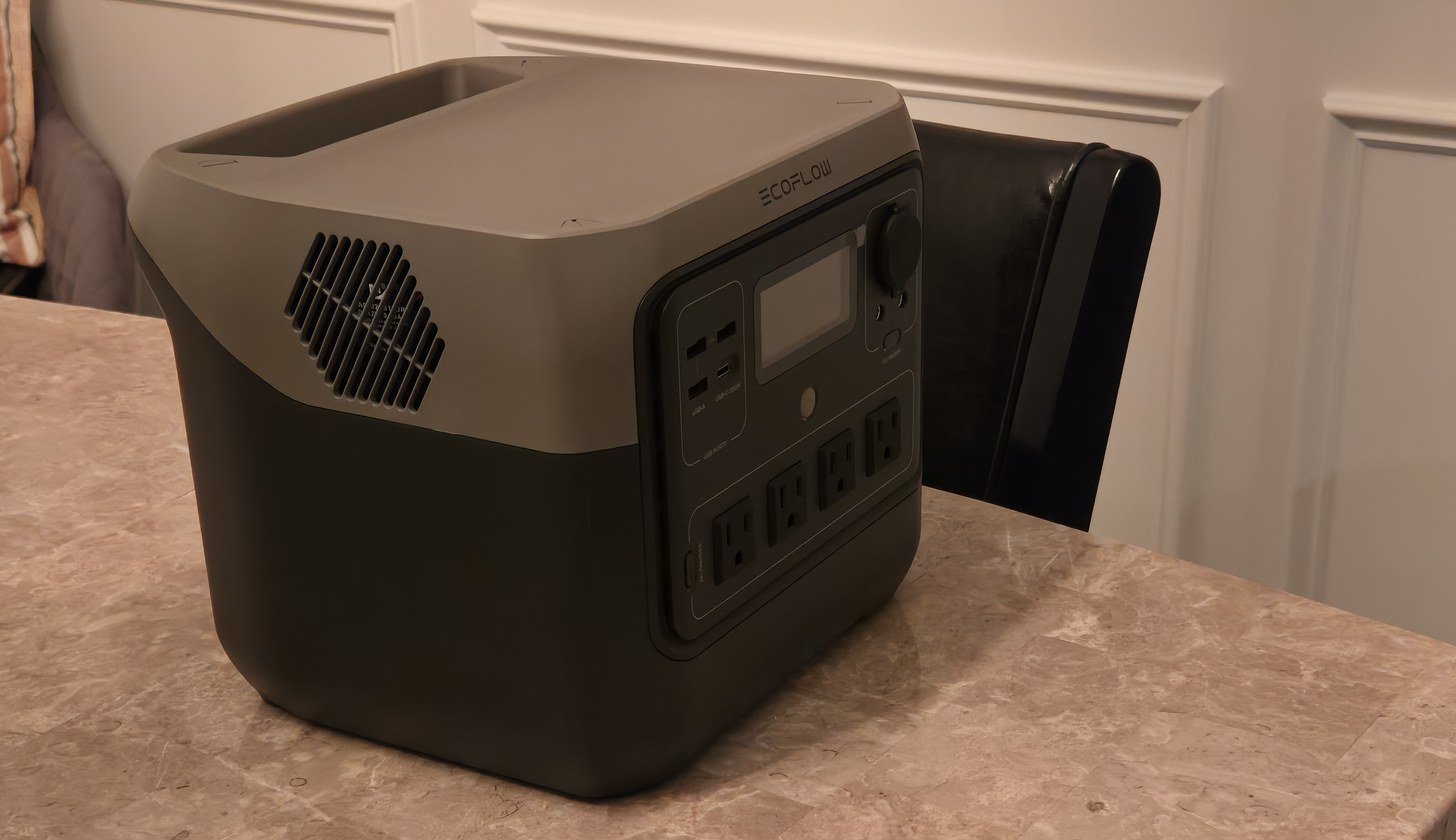
The first time the power went out after we bought our EcoFlow River 2 Pro, we did what any new owner might do. We pulled it out of the closet, set it on the breakfast table near the kitchen where the whole family could get to it, and started plugging things in. Almost right away the display dropped to 98 percent. After that it came down much more slowly for the rest of the evening. That is simply what the display on ours showed, and it is the kind of small detail worth knowing before you buy.
This guide is the list of things worth knowing before that first purchase, written from several storm seasons with that one unit. There are seven lessons, each paired with what to look for on the spec sheet, followed by five places to start, grouped by size. Every capacity, output, weight, and recharge figure below is the manufacturer's or the listing's published rating, quoted as published. One of the five picks is ours. The other four were researched from the manufacturers' published information and buyer feedback, and each entry says which.
1. Start with your list, not the spec sheet
We bought ours for a simple reason: we wanted one large charging device in the house that could charge several things at once when the power went out. That is a list, even if it is a short one, and it is the right place for anyone to start.
Before comparing a single product, write down what actually needs to keep running in an outage at your house, and how long your outages usually last. For some households that is phones and earbuds. For many it is phones, a laptop or two, a few lights, and maybe a router. The list points to a size more reliably than any spec sheet does, and it keeps you from paying for capacity you will not use or coming up short on the night it matters.
Our free device checklist is a one-page version of this exercise, with space to write in your own devices and the figures from their labels.
2. Watt-hours and watts are two different numbers
Every power station lists two headline numbers, and they do different jobs.
Watt-hours (Wh) is capacity: how much energy the battery holds. Think of it as the size of the tank. A bigger number means it can keep things going longer before it needs recharging.
Watts (W) is output: how much power the unit can deliver at one moment. Think of it as how wide the hose is. It decides whether a device can run from the unit at all. Every device has a watt figure on its label or power brick, and the power station's output rating needs to cover everything plugged in at the same time.
Many listings also show a second, higher output figure, labeled surge, peak, or a boost mode. The rated or continuous figure is the one to read first.
3. Battery type matters for something that lives in a closet
Many power stations now use lithium iron phosphate batteries, written LFP or LiFePO4. Others use standard lithium-ion. Manufacturers rate LFP batteries for more charge cycles than lithium-ion. A charge cycle is one full use of the battery's capacity, whether that happens in one long night or across several shorter ones.
For something that spends most of its life switched off in a closet and comes out a few times a year, a longer rated life is worth having. EcoFlow rates our River 2 Pro's LFP battery for over 3,000 charge cycles. All five picks below use LFP batteries, per their manufacturers. On the spec sheet, look for "LFP" or "LiFePO4" and the rated cycle count.
4. Know how it will recharge
After an outage, the power station needs to be refilled, and the ways to do that vary by model. A wall outlet is the usual one. Many units can also recharge from a car's 12-volt socket or from solar panels, at the speeds each manufacturer publishes.
EcoFlow lists four ways to recharge the River 2 Pro: a wall outlet, a car, solar, and USB-C, with a wall recharge from empty to full in about 70 minutes. After an outage, we recharge ours from a wall outlet.
On the spec sheet, check two things: the wall recharge time, and what comes in the box. On some models the car charging cable is a separate purchase, and solar panels are usually sold separately unless the listing says it is a bundle.
5. Count the outlets you would use at the same time
Going in, we expected to use the USB ports on ours more than we have. In practice we have used the USB charging less than we thought we would and mainly use the AC outlets, the ones shaped like the outlets in your wall.
Look back at your list and count how many things would be plugged in at once, then check the outlet count on the spec sheet. The River 2 Pro has four AC outlets. Outlet counts vary from model to model, even among units with the same capacity, so it is worth checking each one.
6. Weight, and where it will live
Weight is one of the easiest numbers to skip on a product page. EcoFlow lists the River 2 Pro at about 18.2 pounds. It is a heavy device, but the built-in handle makes it easy to carry from the closet to wherever it is needed. When comparing units, look up the weight, picture carrying it, and look for a handle that suits how you will move it.
Noise matters too if the unit will run in a living area or a bedroom. Ours is surprisingly quiet, and in our experience noise has not been something we think about. Some manufacturers publish a noise figure in decibels, a measure of loudness; EcoFlow lists the RIVER 3 230 below at under 30 decibels, for example.
Where it will be kept matters as much as where it will be used. Manufacturers publish a storage temperature range in the manual. EcoFlow lists the River 2 Pro's storage range as 14°F to 113°F and names 68°F to 86°F as ideal, which is worth knowing before choosing a garage or an attic over an indoor closet.
7. Storage between outages
Ours is stored switched off in a closet between outages. Pulled out after months, the display reads about where it was left, unless the previous outage ran it down hard. That is simply what the display shows, but it has held up across many storms. The habit that came out of it is simple: when a big storm is in the forecast, it gets plugged in the day before.
We also use the EcoFlow app, mainly to check the unit's status when we are not in the same room with it. If a model has an app, the listing will say so.
Five places to start
These are grouped by size, from a small unit for an evening of phones and a laptop to larger units for a longer list. Each figure is the manufacturer's or the listing's published rating. Prices move often, especially during sales events, so check the current price on Amazon before buying.
One more habit worth borrowing before you buy any of them: read the reviews in more than one place. We chose the River 2 Pro after reading buyer reviews on Amazon and watching reviews on YouTube, where it rated well on both, and we would buy it the same way again.
Small: EcoFlow RIVER 3 230
Researched. EcoFlow rates the RIVER 3 230 at 230Wh with 300W of rated AC output and an X-Boost mode up to 600W, on an LFP battery, with a one-hour fast charge from the wall and room to charge up to six devices at the same time. EcoFlow lists it at under 30 decibels. The listing gives its weight as 7.8 pounds, with a built-in handle. It suits a short list: phones, a laptop, and a light for an evening, in a unit that is easy to move around the house.
Mid-size: EcoFlow River 2 Pro
Owned. EcoFlow rates the River 2 Pro at 768Wh with 800W of AC output and an X-Boost mode up to 1600W, on an LFP battery it rates for over 3,000 charge cycles, with four AC outlets, a wall recharge in about 70 minutes, and a weight of about 18.2 pounds.
This is the unit the lessons above come from. We bought it to charge several devices at once in the house, and in practice it sits on the breakfast table near the kitchen, where the whole family can get to it, and charges phones, then a laptop or two, mostly through the AC outlets. It is heavy, the handle makes it easy to carry, and it runs quietly. It has never been asked to run a refrigerator, a microwave, or anything with a motor, and we have never had a reason to try.
Mid-size: Dabbsson 600L
Researched. Dabbsson rates the 600L at 768Wh with 600W of rated AC output and a 900W Power Boost mode, on an LFP battery it describes as a semi-solid-state design, with two AC outlets among eight outputs in total. The listing gives a full recharge from the wall in about 1.6 hours and a weight of about 17.6 pounds. It matches the River 2 Pro on capacity with a lower output rating and fewer AC outlets, from a brand that is newer to the category. That makes it a good example of why lesson 5 matters: two units the same size can be set up quite differently.
Large: EcoFlow Delta 3 Classic
Researched. EcoFlow rates the Delta 3 Classic at 1024Wh with 1800W of AC output and a 3600W surge, on an LFP battery, and lists a charge from empty to 80 percent in about 45 minutes from the wall. EcoFlow's published weight works out to about 26.7 pounds. This is where a power station starts to cover more than phones and laptops, and where weight steps up with it.
EcoFlow Delta 3 Classic on Amazon
Large: Jackery Explorer 1000 v2
Researched. Jackery rates the Explorer 1000 v2 at 1070Wh with 1500W of AC output and a 3000W surge, three AC outlets, LFP cells rated for 4,000 cycles, and a weight of 23.8 pounds with a folding handle. Jackery gives a full recharge from a wall outlet in 1.7 hours by default, or one hour in the app's emergency mode. It is a step up for a household whose list is longer or whose outages tend to run overnight and beyond, and it carries a large body of buyer feedback.
Jackery Explorer 1000 v2 on Amazon
At a glance
| Unit | Size group | Manufacturer capacity | Manufacturer AC output | Battery | Weight | Wall recharge | Owned or researched |
|---|---|---|---|---|---|---|---|
| EcoFlow RIVER 3 230 | Small | 230Wh | 300W | LFP | 7.8 lb per the listing | about 1 hr | Researched |
| EcoFlow River 2 Pro | Mid-size | 768Wh | 800W | LFP | about 18.2 lb | about 70 min | Owned |
| Dabbsson 600L | Mid-size | 768Wh | 600W | LFP | about 17.6 lb per the listing | about 1.6 hr per the listing | Researched |
| EcoFlow Delta 3 Classic | Large | 1024Wh | 1800W | LFP | about 26.7 lb | 0 to 80% in about 45 min | Researched |
| Jackery Explorer 1000 v2 | Large | 1070Wh | 1500W | LFP | 23.8 lb | 1.7 hr, or 1 hr in emergency mode | Researched |
Capacity, output, battery type, weight, and recharge times are the manufacturers' or listings' published figures. AC output is the rated figure, not the surge or boost figure. Prices change often and are not listed here; check the current price on Amazon.
Not a Prime member? Amazon offers a free Prime trial for eligible customers, with free shipping on Prime-eligible items.
What we own versus what we researched
One of these is owned. The EcoFlow River 2 Pro has been used through several storm seasons in our home, and everything said about how it behaves comes from that use. The other four were not owned or handled. Their entries rest on what each manufacturer or listing publishes and on the pattern of buyer feedback, and nothing in this guide should be read as a test result.
Related
- Portable power for storm outages, eleven picks by size, from power banks to 1000Wh power stations
- Start Here, the short version of everything on this site
- How This Site Works, where the information comes from
Before you buy
Three things, in order: make your list of what needs to keep running and for how long; check the two numbers, watt-hours for how long and watts for what it can run; and decide where the unit will live between outages. The free device checklist puts the first step on one page, with space to write in your own devices.
More in Storm & Outage Backup
About the author
This guide was written by the owner of Power Outage Lab, a portable power station owner for several years. The owner keeps four portable power stations and one power bank for storm outages and travel, and is not an electrician or an engineer. Every recommendation in this guide says whether the unit is owned or researched.
More about this site